
I Vibe-Coded My Own App for My Home Camera: No Monthly Fee, No Alerts While I'm Home
In about two hours of vibe coding I built my own app for an off-the-shelf network camera, with no need for the manufacturer's app. Recordings stay on my own computer, it records only when something moves, deletes clips after 7 days and stops alerting me while I'm home. Here is what it does and roughly how it was built.
I'm Debitto, CEO of MetAI.
I keep an off-the-shelf network camera (a TP-Link Tapo C200) in my living room. I had always used the manufacturer's app, but one evening I wondered whether I could run the camera from an app of my own, and I built one by vibe coding.
Vibe coding means describing what you want to an AI in plain words instead of writing the code yourself. I talked to Claude in Spanish, my first language, and it took about two hours. I did not write a single line of code.
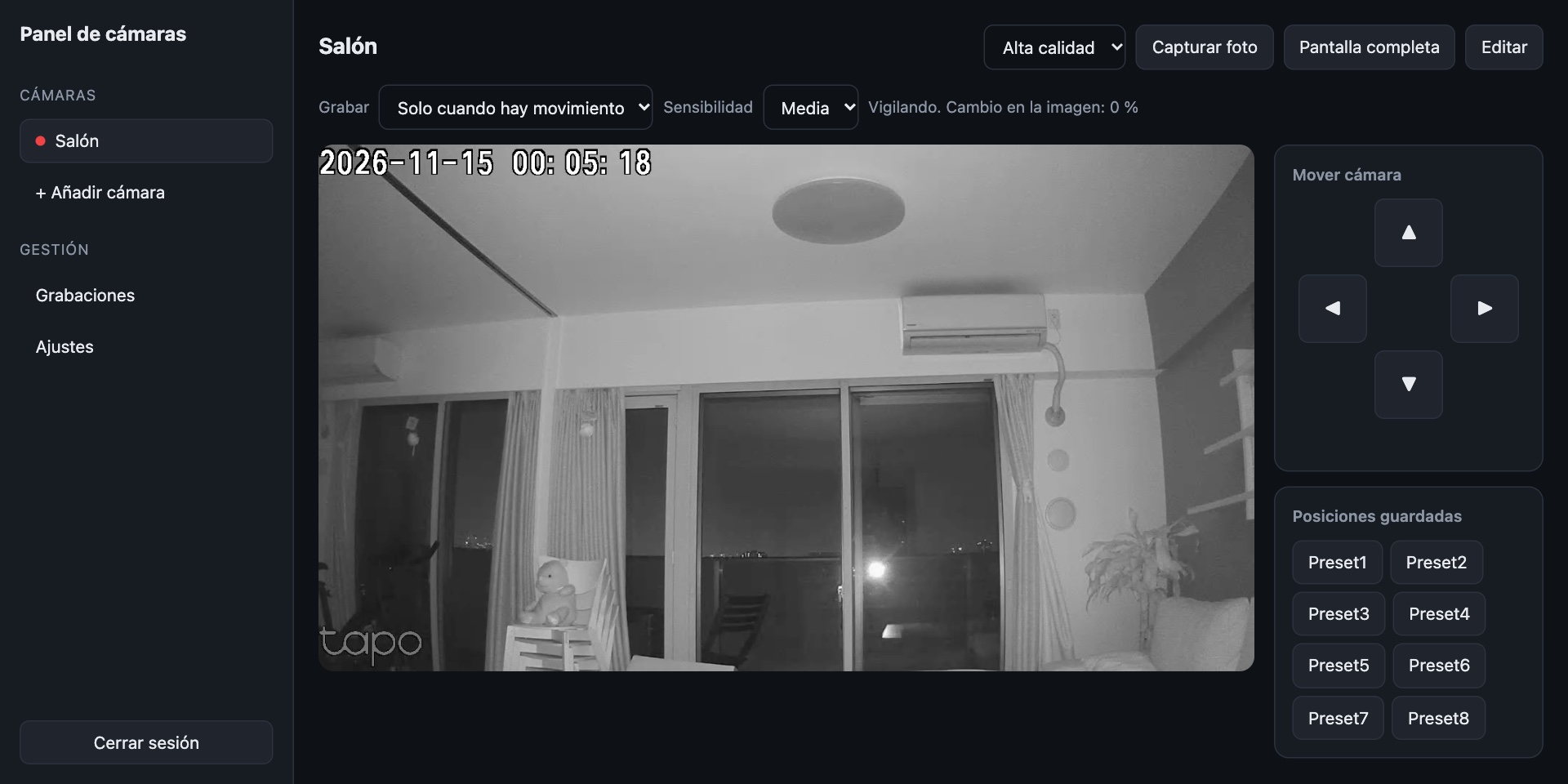
My own admin panel: live video, camera movement and recording settings on a single screen (night-time image; the interface is in Spanish).
What it can do now
- No manufacturer app needed. A private admin panel in the browser shows the live video and lets me pan and tilt the camera.
- Recordings stay on my own computer. No monthly cloud recording plan and no microSD card: the footage is saved on a computer at home.
- It records only when something moves. Instead of keeping 24 hours of video, it saves short clips of the moments with motion. Each clip starts five seconds before the motion, so you can see what happened.
- Clips are deleted after 7 days. Old clips disappear on their own, so the disk never fills up.
- Alerts with video on my phone. When something moves, the clip arrives in a messaging app.
- Access from anywhere. I can watch the live video and move the camera from my phone when I am out.
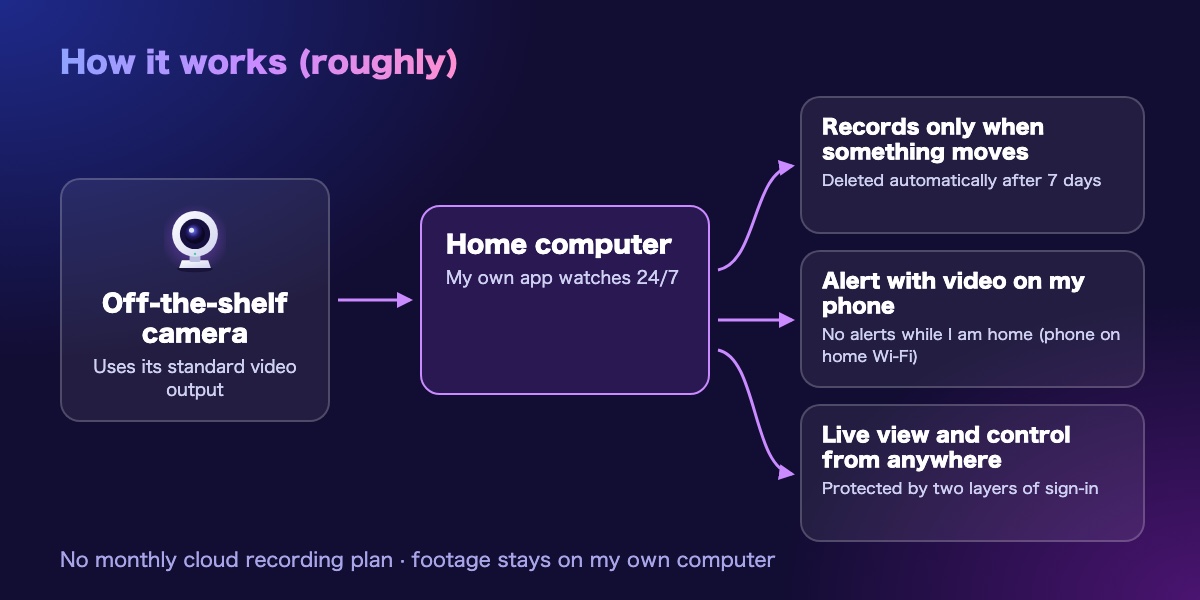
No alerts while I'm home
The first problem showed up right away: I got an alert every time I walked across my own living room.
My first idea was face recognition. But a camera that covers a whole room sees faces as a few pixels, and it sees no face at all when I have my back to it or at night. If it fails to recognize me, the alerts keep coming. If it mistakes someone else for me, it silences the one alert that matters.
So I went with something simpler and more reliable: the app only checks whether my phone is connected to the home Wi-Fi.
- Connected (I'm home): clips are still saved, but no alert is sent.
- Not connected (I'm out): alerts arrive with video, as before.
It needs no GPS and no extra app on the phone. About ten minutes after I leave, the alerts come back on their own.
How it was built, roughly
I'll skip the technical details, but this is the outline.
- The camera was not modified. Many network cameras have a standard video output meant for recorders. I only switched that feature on in the manufacturer's app.
- A small app runs on a computer at home. It receives the video, shows it in the admin panel, watches for motion and saves the clips.
- Motion detection just compares frames. If a frame differs enough from the previous one, that counts as motion. Detection pauses while I am moving the camera myself.
- Remote access goes through an encrypted route. Nothing is opened on the home router, and the panel is reachable only after two layers of sign-in: an identity check and a password.
What didn't go smoothly
Not everything worked the first time.
- The live video froze after a few seconds. The cause was faulty timing information in the audio the camera sends. The AI inspected the video data, found the cause and fixed it. After the fix, the delay dropped from several seconds to about 0.2 seconds.
- The home computer has to stay on. If it goes to sleep, recording and alerts stop.
- The live view has no sound yet. The saved clips do have audio.
I typed the passwords, signed in to each service and set who can access the panel myself, rather than leaving that to the AI. Deciding what the AI does and what a person decides is, I think, an important part of vibe coding.
From "I wish I had this" to a working tool
This app is for my home, but the point was not to use a product as it comes: it was to reshape a tool around the way I actually use it.
At MetAI we work this way to build internal tools and web tools fitted to a business, and to set up AI that runs locally. If you are wondering what that would look like for you, get in touch.